
Diagnostics
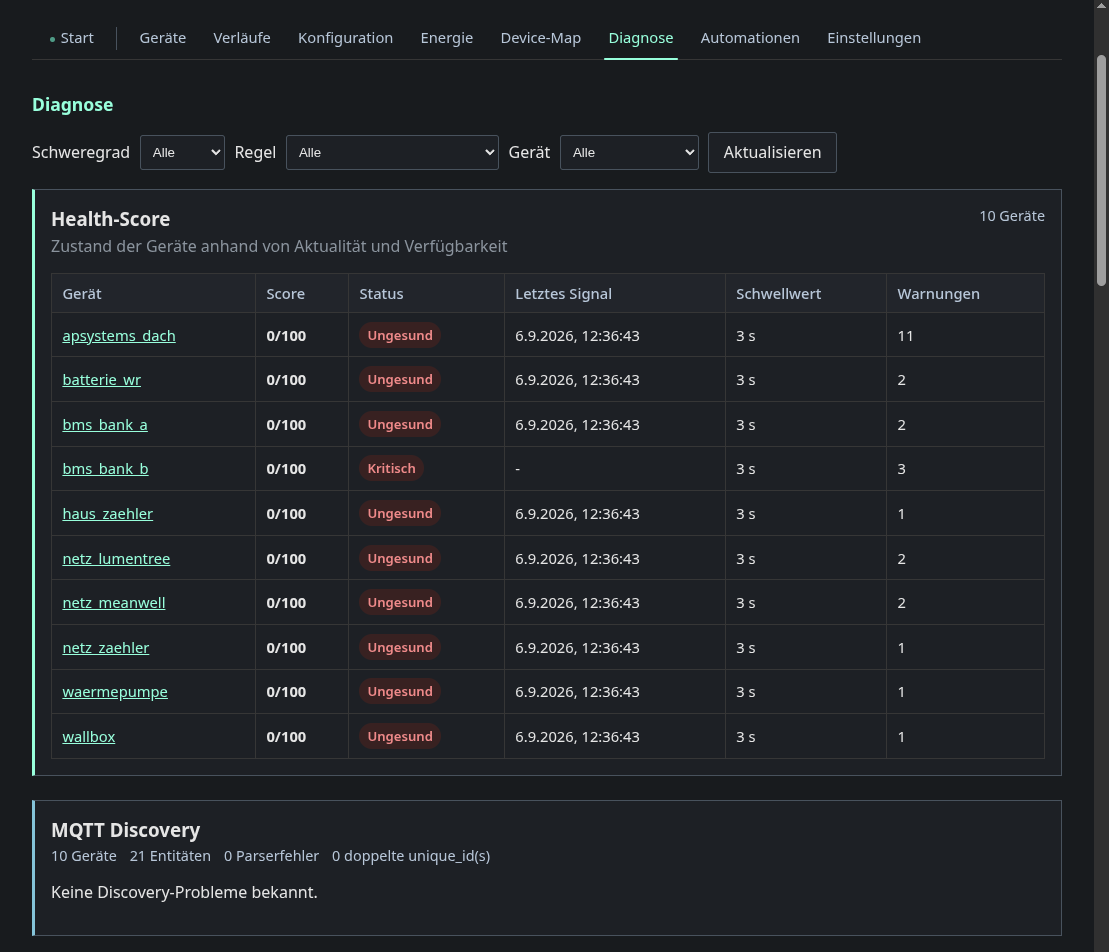
The line under the title sums up the current state, for example “1 critical, 26 warnings across 11 devices”. Its dot turns green, yellow or red with the most severe finding. Next to it you see when the page last checked, and Refresh checks again.
The MQTT discovery chip counts devices and entities. It turns red when there
are parse errors or duplicate unique_ids, and a card below lists the
problems behind them. Duplicate unique IDs are the usual reason Home Assistant
merges two devices into one.
Health score
Every device has a card with its score ring, its status, the time of its last signal and its number of warnings. The worst device comes first. A device that has never sent anything shows as critical with “No signal yet”. In the screenshot every device is “unhealthy” because the fixture broker replays the retained messages once and then goes quiet. On real hardware the poll intervals keep the scores up. (will be replaced in future: diagnostics cleanup. Today the score ages out after the health threshold from the settings, which is 3 seconds by default, and no service reports its poll interval any more.)
Click a card to show only the findings of that device. Click it again, or the device chip in the findings toolbar, to show all devices again.
Findings
By cause groups the findings by their reason, most severe first. Each group names the cause, explains it once, tells you what to check and lists the affected entities per device. Critical groups start open. Click a device name inside a group to filter by that device.
List shows every finding as a table row that you can sort by severity, device, entity or rule.
The severity switch (All, Critical, Warning) works in both views and shows how many findings each choice leaves.