
Energy
The Energy tab turns your sensors into an energy balance. It sets the energy roles of every power and charge entity, the groups and the custom categories, and it shows how the house consumption is derived. To see where that energy flows, open the device map. Roles, groups and categories are shared between both tabs, so a change on one shows up on the other right away.
Plant live
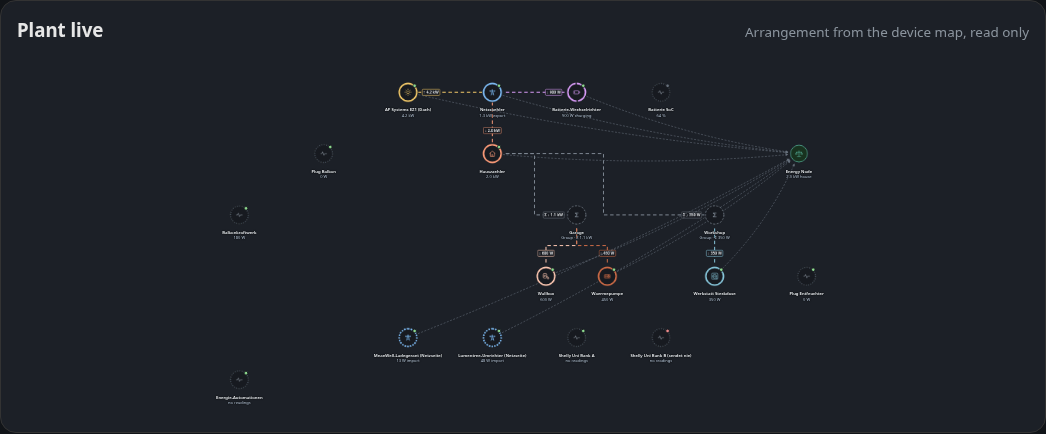
The device map arrangement, read only, with the live flow and the energy balance. Click a device to light up its rows in the role table, click a group to jump to its card.
Balance interpretation
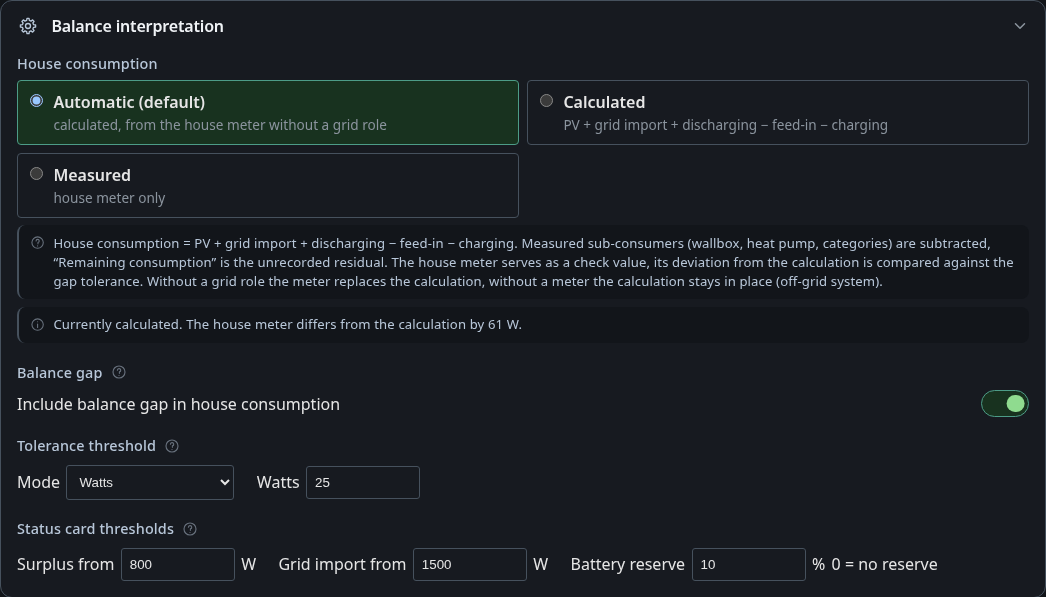
| Mode | House consumption is |
|---|---|
| Automatic (default) | PV + grid import + discharging − feed-in − charging. A house meter is a cross-check and is used when no grid role is assigned |
| Calculated | always the calculation, a house meter is only compared |
| Measured | the house meter |
In every mode, wallbox, heat pump and custom consumer categories are subtracted from house consumption. What is left is shown as remaining consumption. A line below the modes tells where house consumption currently comes from and whether the house meter matches the calculation.
The role House meter always means the whole house. Metered sub-consumers belong in a custom consumer category. Setups that used the former Combined mode were converted automatically: every entity with the old role became its own consumer category named after the entity. Rename them under Custom categories. An entity that only got the role by name detection (not saved) is treated as house meter afterwards. If the status line reports a deviation, check it.
When house consumption is calculated, “Remaining consumption” is a remainder, not a measurement. It takes in every consumer without a meter of its own.
Below that: whether a remaining gap counts as house consumption, the tolerance, the surplus and grid import thresholds of the status card and the battery reserve.
Balance gap
The gap is what is left when sources (PV, grid import, discharging) and sinks (consumption, feed-in, charging) do not add up.
With Unknown consumer (the default) the gap is added to house consumption. A negative gap shows up as “Unknown generation”. Self-sufficiency is then higher than in diagnostics, because the extra consumption counts as covered. With Diagnostics the gap stays visible as “Unassigned”, and the status card reports an unbalanced balance.
Gaps below the tolerance count as balanced. The default is 25 W, or 2 % of the total power in percent mode.
In Calculated mode a gap can only be negative. That happens when wallbox and heat pump together report more than the calculated house consumption, usually because of a wrong scale or invert on one of their meters. A large gap in other modes mostly means a power entity without a role, see the list at the top of the tab.
Key figures
Self-sufficiency is the share of house consumption not drawn from the grid. Self-consumption is the share of PV yield not fed into the grid.
Energy roles
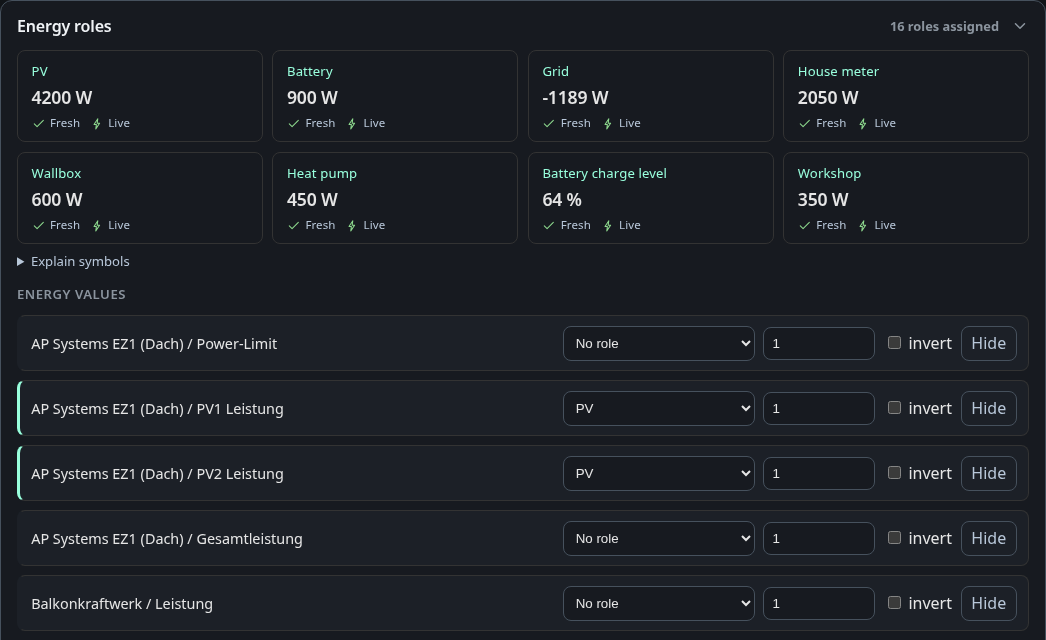
Every power and charge entity gets a role such as PV, grid, battery, house meter, wallbox, heat pump or a custom category. Entities sharing a role are summed. Battery charge levels are the exception: each bank needs its usable capacity, and the total is weighted by capacity. A bank without capacity is left out and the tab says so. The tiles show each role with its value and whether it is fresh and live. Power values without a role are listed at the top of the tab, because they are the usual reason a balance does not add up.
An entity without a role can be hidden with the button on its row. The list of hidden entities is saved with the energy configuration, so it is the same in every browser, and the device panel of the device map leaves these entities out too. An entity with a role cannot be hidden, and assigning a role to a hidden entity shows it again.
Switches have their own role, Switches, in a separate group. It marks a socket or relay output, adds no power to the balance and is read by the device map. A device with several switches also gets a channel from 1 to 16 for each switch, so the map can tell which connection a switch cuts. Two switches of one device cannot share a channel. Switches the dashboard detects stay “detected” until you change or save them.
Groups
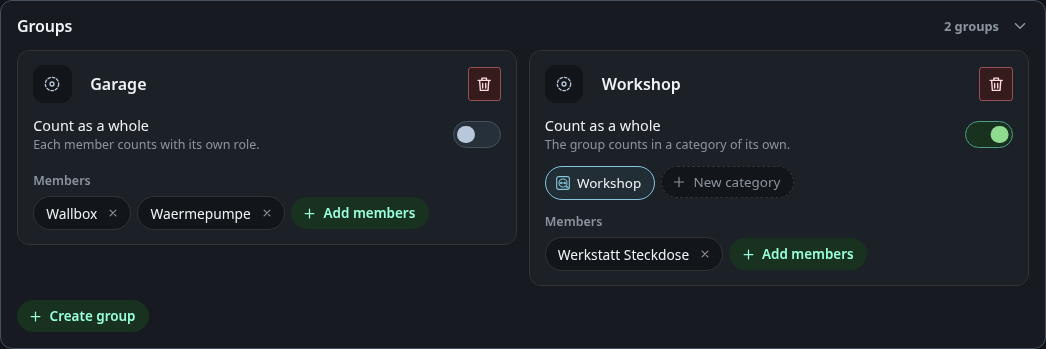
A group bundles devices without a meter of their own.
- Count as a whole off (Garage): every member counts with its own role.
- Count as a whole on (Workshop): the group counts in one consumer category. Pick it from the chips or create a new one in place.
A device sits in at most one group. Groups can hold other groups.
Custom categories
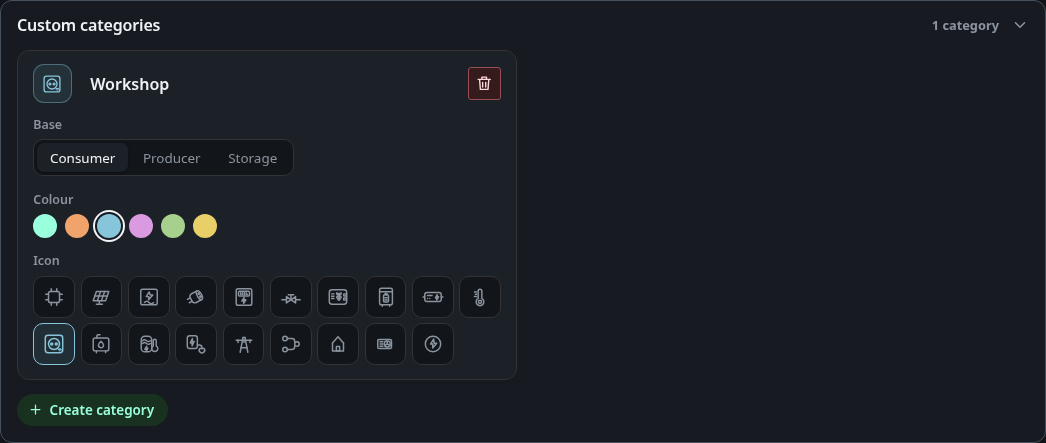
Your own consumer, producer or storage types next to the built-in roles. The base decides how the category counts: consumers like house load, producers like PV, storage like a battery. Each consumer category appears as a sink of its own in the overview tiles and in the history. A category that roles or groups still use cannot be removed. Automation rules do not block removal, but the dashboard lists the rules that still read the category before you confirm.
Sub-devices
A sub-device names the consumer behind a power measurement, for example “Washing machine” instead of “Plug B / Power”. Where a sub-device exists, its name replaces the label of the measurement on this tab, in the role table and in the energy flow. The role itself is still set on the measurement, as before, and a sub-device changes nothing else.
Permissions
Changing roles, groups, categories or the interpretation needs the permission
edit_energy. Until there is a user management every account has it, guests
included.