
History
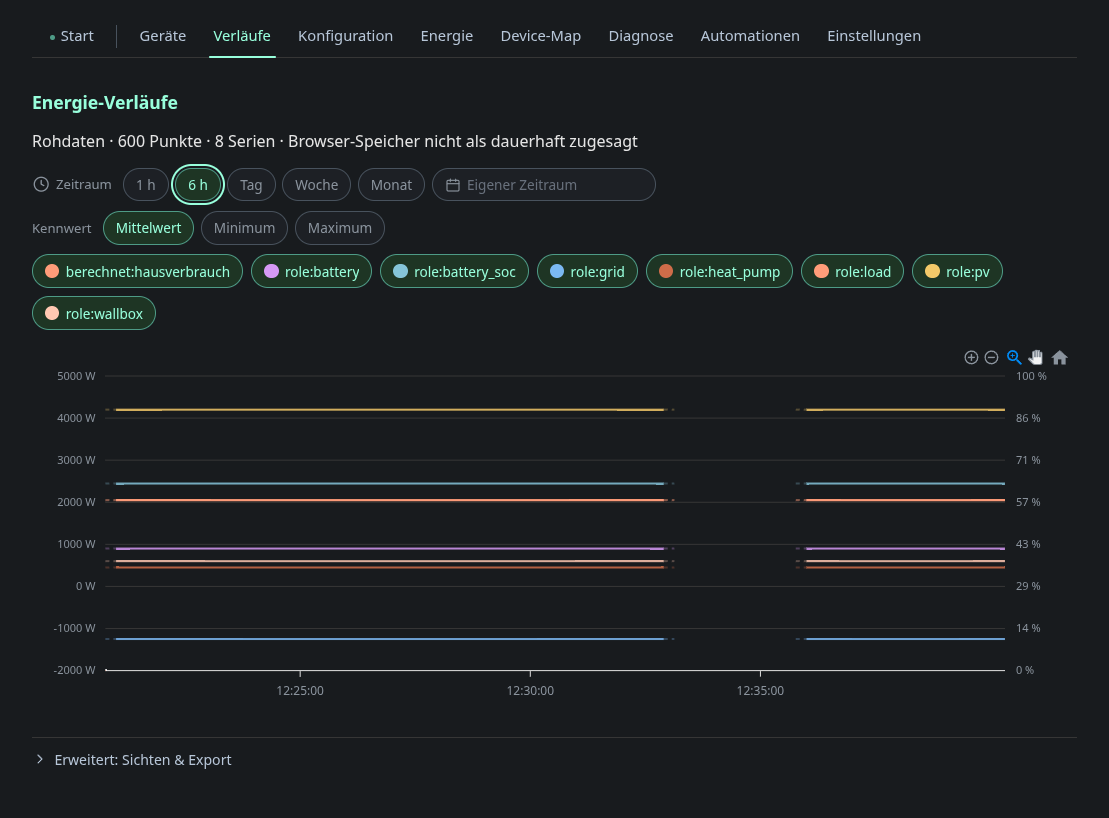
The node stores no history. The browser records it: a recorder samples
/api/v1/energy at an interval and writes to IndexedDB, so the Pi’s SD card
and RAM are not involved at all.
You can choose the time range (1 h, 6 h, day, week, month, 3 months or a custom range) and the metric per bucket (average, minimum or maximum). The series are every energy role plus computed ones such as House consumption (calculated). Click a chip to show or hide a series. Under Advanced: views & export you can save a set of series as a named view and export the visible data as CSV or JSON.
Resolutions
The status line above the chart carries the resolution as its first pill. Pick
it to open the list of resolutions that fit the chosen span. Each entry shows
the share of the span that the resolution covers with values in this browser,
for example 5-minute average · 97 %. The pill itself shows only the name of
the current resolution. The automatic choice is the coarsest resolution that
has data. A finer resolution takes over when it covers at least 20 % more of
the span. Pick an entry to choose a resolution yourself. It stays until you
pick another one or change the span, which returns to the automatic choice. The
choice belongs to the page session. A reload starts again with the automatic
choice.
Directly behind the resolution pill, a round icon button pauses the automatic updates. Pausing stops the page from refreshing the chart and from exchanging history with other browsers for the rest of the page session. The status dot then turns amber and does not pulse, and a warning pill after the “not persisted” pill says that the chart is not updating. Explicit actions such as changing the span, the resolution, the series or the metric still load data. Pressing the button again (Resume updates) reconnects the exchange and reloads the chart once. The controls stay visible while the page reloads after a change, so the line does not flicker.
| Resolution | Offered for a span of | Where the values come from |
|---|---|---|
| Raw data | up to rawWindowHours (default 24 h) |
Samples recorded in this browser |
| 1-minute average | from 1 h up to minuteWindowDays (default 7 days) |
Minute averages recorded in this browser |
| 5-minute average | from 24 h | Five-minute averages in this browser, with minute values filling the gaps |
| Hourly average | from 7 days | Hourly means from the energy statistics on the node |
The history tile on the overview always shows the coarsest resolution the span allows. Saved views store their series, range and metric but no resolution, so applying a view returns to the automatic choice.
Raw samples are compacted into one minute and five minute tiers as they age. The hourly resolution is not kept in the browser. The page reads it from the node.
Hourly values
Hourly values come from GET /api/v1/energy/stats/hours on the node, see
api.md. An hour that the node recorded itself counts only when it
holds at least 50 minutes of recording. Hours from Home Assistant always count.
A series appears only if at least one of its hours is not zero.
House consumption at the hourly resolution is the node’s own load_total value.
It is not calculated from the other series, because a calculation from mixed
resolutions would not match the full hour.
If a series has no hourly values, it falls back to five-minute averages. The line above the chart then says how many series use the fallback. This also happens when the node cannot answer, for example because it runs without a data directory.
Two units in one chart
Most series are power in watts. The battery state of charge, if a role provides it, is a series in percent. When both are visible, the chart gives each unit its own axis: watts on the left, percent on the right with a fixed scale from 0 to
- The tooltip names every value with the unit of its own series. The state of charge is not part of House consumption (calculated).
Storage limits
The recorder writes into the storage the browser grants to this page. Three things can go wrong:
- The quota is full. Recording stops at the first failed write and the status line says “Recording was paused because the browser storage is full”. Retrying would only fail again, so it does not retry. The pause survives a reload. Reduce the storage budget or shorten the retention under Settings: History. The page has no button to resume recording yet.
- The browser may delete the history. The recorder asks the browser to keep the data (persistent storage). When the browser does not agree, the status line says “Storage not guaranteed”. On iOS Safari the history can disappear under memory pressure even if the browser agrees. Firefox grants only a fraction of the free disk space to a page, so a large budget can hit the browser limit before it reaches the configured budget.
- The history is per browser. A saved view opens on every device, but it only shows what that device recorded or received through the exchange below.
Exchange between browsers
When two browsers have the dashboard open at the same time, each fetches the tiers it is missing from the other through the node. The server runs an SSE hub for this and stores no data. A browser’s own measurements are never overwritten. Minute values are only exchanged up to 30 minutes before now. When the page shows a range that reaches into that last half hour, it asks the other browsers for it as well.
The status line above the chart names the resolution, the number of points and series, and whether the browser has granted persistent storage.