
Lovelace card
The integration comes with its own Lovelace card, custom:battery-soc-card,
and registers it with the frontend itself, so you do not need a resource entry
under Settings → Dashboards → Resources. The card has two displays: a
column (stored energy and time remaining) and a trajectory (a ring with six
hours of history and a six hour projection).
display: column |
display: trajectory |
|---|---|
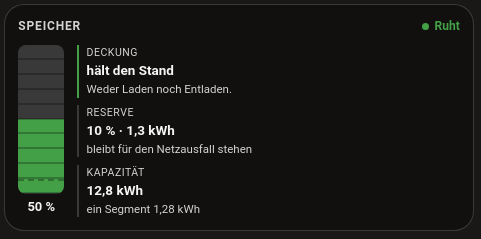 |
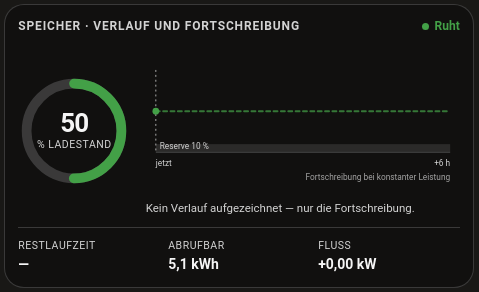 |
Configuration
type: custom:battery-soc-card
display: trajectory          # column | trajectory
soc_entity: sensor.speicher_soc_combined
power_entity: sensor.speicher_net_power
capacity_kwh: 12.8
reserve_percent: 10          # 0 = no reserve
invert_power: false          # true if your meter reports discharge as positive
runtime_entity: sensor.speicher_time_to_empty   # optional, wins over the linear estimate
| Option | Meaning |
|---|---|
display |
column or trajectory. |
soc_entity |
The state of charge sensor. The only required option. |
power_entity |
Net battery power, positive while charging. |
capacity_kwh |
Usable capacity, used for stored energy and time remaining. |
reserve_percent |
Reserve the battery should not go below. 0 means no reserve. |
invert_power |
true if your meter reports discharge as positive. |
runtime_entity |
Optional time remaining sensor. Wins over the linear estimate. |
Without a Recorder history for soc_entity (Recorder disabled, or retention
shorter than six hours) the trajectory display only shows the projection. That
is normal after a restart.
The card does not appear
The card only appears once the integration is set up as a device. It is
registered with the frontend from async_setup_entry, so add a Battery SoC
entry under Settings → Devices & Services first and then restart Home
Assistant. Until then Lovelace reports Custom element doesn’t exist:
battery-soc-card. If it still fails after the restart, reload the browser
with Ctrl+Shift+R to drop the cached dashboard.