
energy-node Icons for Home Assistant
energy-node Icons is a custom icon set for Home Assistant with the eighteen device symbols of the energy-node dashboard plus a generic fallback. Each icon is an outline that Home Assistant fills with your theme’s icon colour, so the icons match the rest of your dashboard.
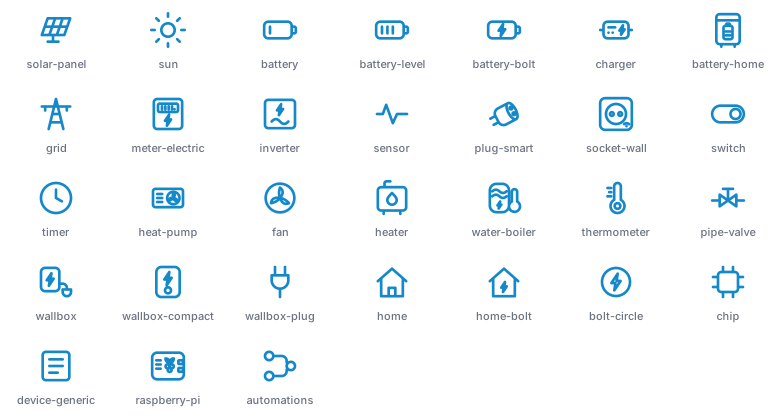
The set covers batteries, solar panels, the grid, heat pumps, meters and a few infrastructure symbols. The Icon catalogue lists every icon with its name.
Install via HACS
Install the set through HACS as a custom repository.

The button opens HACS in your Home Assistant with the repository pre-filled. Or add it by hand:
- Open HACS → ⋮ (top right) → Custom repositories.
- Repository URL:
https://github.com/Developer-Simon/ha-energy-node-icons - Category: Integration → Add.
- Search for energy-node Icons → Download.
- Restart Home Assistant.
- Settings → Devices & Services → Add Integration → “energy-node Icons” (this loads the icon set into Home Assistant).
Manual install
- Download the latest release from ha-energy-node-icons.
- Extract to
<config>/custom_components/energy_node_icons/. - Restart Home Assistant.
- Settings → Devices & Services → Add Integration → “energy-node Icons” (this loads the icon set into Home Assistant).
How to use
Click the icon field of an entity card or sensor. The icon picker opens.
Type energy-node to show only this set, then click the icon you want.
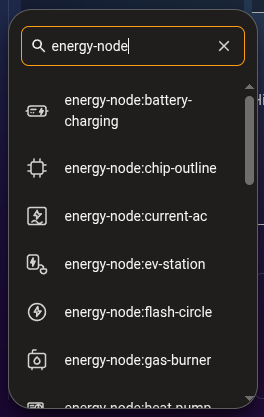
The entity now has the icon name, for example energy-node:solar-panel. Home
Assistant shows the icon in your dashboard, badges and entity rows, filled with
the icon colour of your theme. In YAML, use the name directly:
type: tile
entity: sensor.energy_node_pv_power
icon: energy-node:solar-panel
Icons renamed in October 2026 keep working under their old names, for
example energy-node:ev-station still shows the wallbox. The icon picker
only lists the current names.
About the drawings
The icon strokes are converted to filled outlines at the dashboard’s stroke width, so each icon takes Home Assistant’s icon colour and looks like the dashboard’s stroked symbol.
License
MIT, see LICENSE.