

Battery SoC (LiFePO4 coulomb-counting)
This Home Assistant custom integration estimates the state of charge of one or two LiFePO4 battery banks from sensors you already have. It does not talk to a BMS and needs no extra hardware. You point it at a charge power sensor, a discharge power sensor and one voltage sensor per bank.
The same engine also runs on the node as the battery state of charge service.
display: column |
display: trajectory |
|---|---|
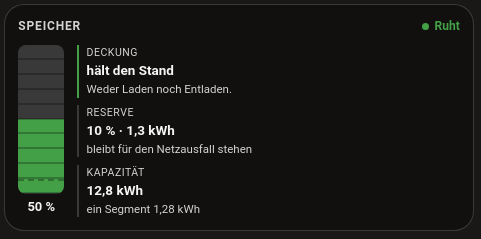 |
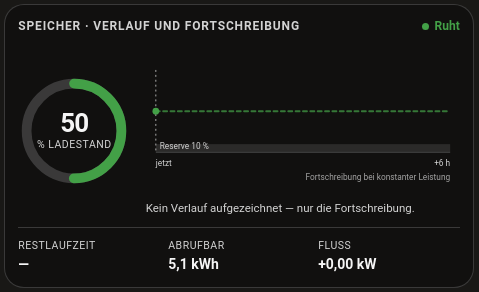 |
The result is an estimate for monitoring and diagnostics, not a safety function of a BMS. Do not use it for automatic shutdowns without independent protection, such as cell monitoring in the charger or BMS. The MQTT service carries the same warning.
What it does
Each battery becomes one device with the state of charge, net power, time to full or empty and a set of diagnostic values (Entities & actions). A single bank and two banks in parallel share one state of charge. Two banks in series get one per bank, and the weakest bank becomes the combined value (Setup).
The integration brings its own Lovelace card. It shows the stored energy and time remaining as a column, or a ring with six hours of history and a six hour projection (Lovelace card).
It also keeps track of its own calibrations and suggests better values for the inverter efficiency and the internal resistance (Calibration suggestions).
How it works
- Coulomb counting. The net battery power (charger power minus inverter power, AC or DC) is integrated over time in Ah. This is the main SoC source. It is accurate in the short term but drifts slowly because of measurement errors, efficiency and self-discharge.
- Voltage recalibration at the ends. A LiFePO4 cell’s voltage curve is almost flat between roughly 15 and 85 % SoC, so the voltage says nothing about the SoC in that range. It only moves noticeably near empty and near full. There the coulomb counter is reset to 0 % or 100 % once the load corrected voltage crosses a threshold and the current is low enough for the reading to count as a resting voltage.
- Load compensation. Instead of a family of voltage curves per load current, the measured voltage is corrected by an offset that depends on the current (mΩ per cell) before it is compared with the resting voltage curve.
- Topology. A single bank or two banks in parallel get one SoC, because parallel banks share one voltage and a split per bank would be made up. Two banks in series get a SoC per bank plus a combined figure for the weakest bank.
The service documentation explains the calculation in detail.
Install via HACS
You need Home Assistant with HACS, power sensors for your charger and inverter, and one voltage sensor per battery bank.

The button opens HACS in your Home Assistant with the repository pre-filled. Or add it by hand:
- Open HACS → ⋮ (top right) → Custom repositories.
- Repository URL:
https://github.com/Developer-Simon/ha-battery-soc - Category: Integration → Add.
- Search for Battery SoC → Download.
- Restart Home Assistant.
Manual install
- Download the latest release from ha-battery-soc.
- Extract it to
<config>/custom_components/battery_soc/. - Restart Home Assistant.
Then continue with the Setup.
License
MIT, see LICENSE.